Product ยท The Adaptive Workspace

Your daily surface on top of SpineWorkspace.

Pulls Spine entities into domain-specific views. Customer Success, RevOps, and BizOps share the same underlying reality โ€” each team sees what they need, nothing more.

Workspace Views

9 views. One workspace.

Account Success

Customer view cards, renewal risk, QBR prep

Customer Success

Health heatmaps, churn mitigation, sponsor tracking

RevOps

Quote-to-Cash velocity, SLA grids, forecasts

Customer view

Every record. Every source.

Canonical objects assembled from every connected tool.

๐Ÿข

Account

Health ScoreARRRenewal DateOpen TicketsLast ContactChampion Status

Sources

SalesforceHubSpotStripeZendesk
๐Ÿ‘ค

Contact

RoleEngagement ScoreEmail HistoryLast MeetingDecision Authority

Sources

SalesforceHubSpotGmailCalendly
๐Ÿ’ผ

Deal

StageValueClose DateProbabilityBlockersNext Step

Sources

SalesforceHubSpotSlackAsana
๐Ÿ“‹

Project

StatusMilestoneOwnerDependenciesBudget

Sources

JiraAsanaMondayNotion

Workspace Features

Built for operational speed

Real-Time Sync

Near real-time entity state updates to every client.

Cross-Tool Context

See CRM, billing, and support data side by side.

Exception Surfacing

Anomalies flagged automatically with evidence.

Action-Ready

Proposed Actions attached to every entity view.

Your workspace. Your context.

Every role gets a purpose-built view of the same the record.

Live Workbench Views
Editable dashboards and Canvas views

See your work. Choose your view.

Run daily work in editable dashboards. Build documents, tables and context graphs in Canvas with reusable UI Library blocks. Both share the blue Workbench shell.

Frame 01 / 05
/workspace/work/service/dashboard
Full Dashboard & Queue
Operational dashboard: Focused preview cropped to the active control area.Click image for full 1600px shell
Storyboard 01 / 05Operational dashboard

Daily work, in one dashboard.

Review Customer Service & Support records, KPIs and items needing attention. Search, filter and inspect without leaving the Workbench.

What you see in this frame

Shows 2 tracked Spine context items (tkt-501, tkt-502), readiness state (92%), and direct Review Plan / View Evidence controls.

Source records remain authoritative; dashboard actions respect workspace policy.
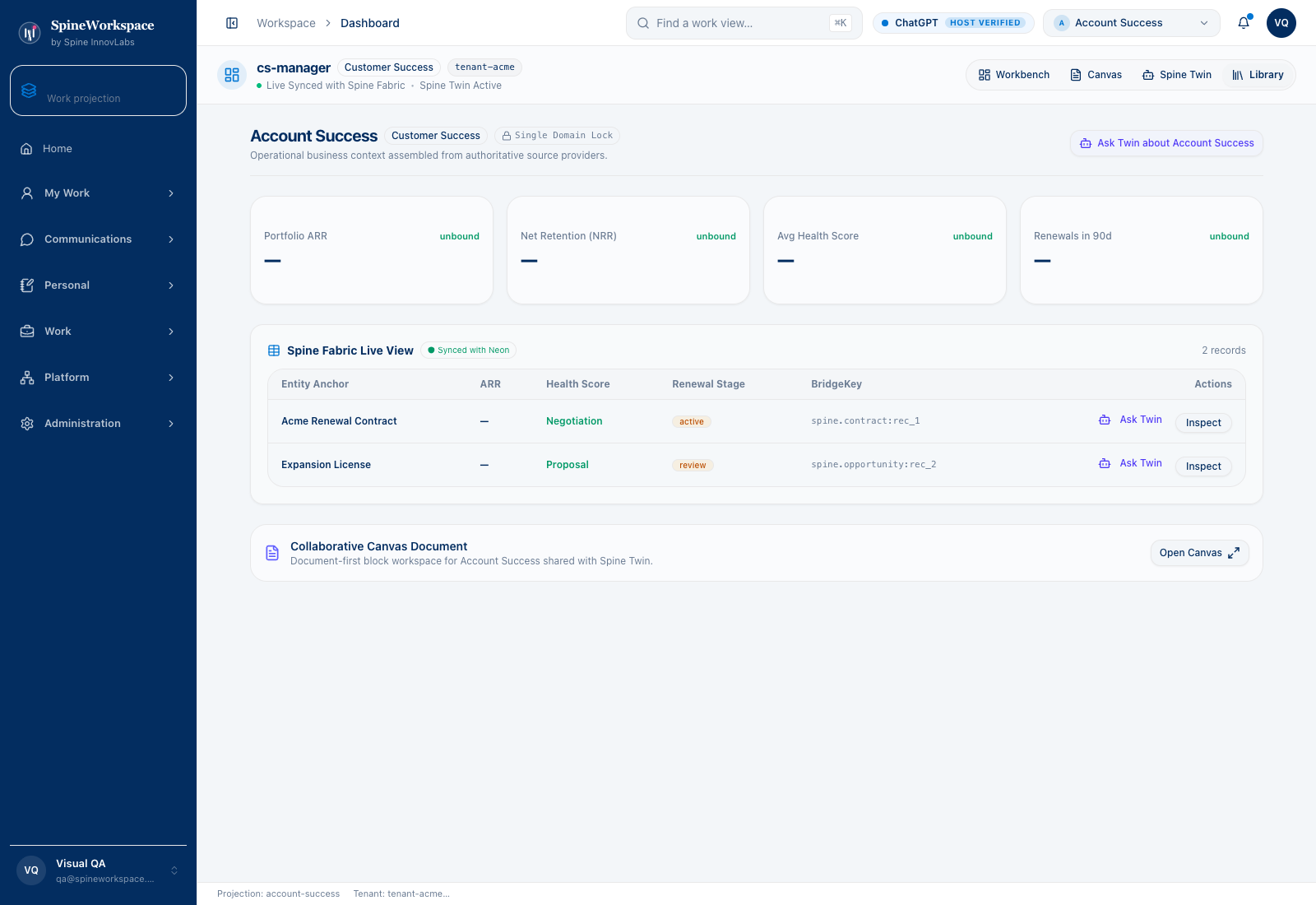
Interactive Storyboard Steps

Step through each operational action inside the dashboard:

Frame 01

Live Queue & KPIs

Track operational items, readiness state and review plans in one unified table.

Frame 02

Inline Draft Editing

Revise local draft notes, owners and due dates right beside connected records.

Frame 04

Instant Search & Filter

Filter by keyword or approval status (Review, In Progress, Approved) in place.

Frame 05

Role Shell & Ask Twin

Launch Inspect or Ask Twin directly from any entity row in the role shell.

About this capture

Captured from the running application dashboard with existing QA fixtures and a reviewed local draft/status repair that is pending application integration. Edits remain in the scoped local outbox. Connected-source changes require the authorized workflow. This capture does not demonstrate a freeform dashboard layout editor.

Actual application captures with QA fixture data. Figures and host badges are not verified live customer telemetry, connection proof or evidence of completed actions.

Explore the adaptive architecture

Workspace Modules

Nine views. One workspace.

Every module gathers into a single operating surface โ€” no tab switching, no context loss.

Customer view

Complete account view with cross-system timeline.

Portfolio Health

All accounts at a glance โ€” health, risk, expansion.

Morning Brief

Overnight changes ranked by business impact.

Unified Inbox

Email, Slack, calendar โ€” one communication stream.

Approval Queue

Review AI suggestions with evidence links.

Knowledge Base

Compounding insights from every decision.

Activity Feed

Every touchpoint threaded by entity.

Team Views

Role-based perspectives โ€” CSM, Manager, Finance.

Health Scoring

Multi-signal scoring with 90-day lookahead.

SPINE INNOVTECH / WHAT'S NEXT

Build on shared context, not disconnected tools.

Explore how our technology connects business context, human judgment and governed AI capability. Start with the company behind the thinking or meet SpineWorkspace, our flagship product.